
How to switch maps
- Open the
WORLDtab. - Open
MAPSand look at the thumbnails; each one previews the scene. - Click the map you want.
- Check that the scene changed before you start placing items.
- Press
Rif the room fills up with debris.
Maps live in their own tab, not in the item list, which is why looking for a map inside ITEMS never works.
Four groups, four reasons to pick one
Liquid pits: pool, lava pit, acid pit. Pick these when you want the result to be immediate and obvious without aiming anything. The dummy goes in, the floor decides the rest. Three pits behave differently in colour and speed, which makes them good for a first comparison and poor for variety later.
Machinery: grinder, crusher, spike room, laser grid. Pick these when you want the room to do the work while you watch. They suit repeated attempts, because nothing needs to be thrown accurately: the trap is already in place. They also produce the least variety, since the trap only does the one thing it was built for.
Wide scenes: snow field, desert, space, underwater. Pick these when the environment is the point. The desert scene is the one to use with an element power, because a wall of water reads clearly against sand. Space puts planets and a UFO in the background, which makes it the best map for a screenshot rather than for a trap.
Indoor rooms: lab, rooftop, castle. Pick these when you want a closed room to fill with characters or debris. The lab adds floor pads that move things, the rooftop adds a drop, and the castle gives you walls.
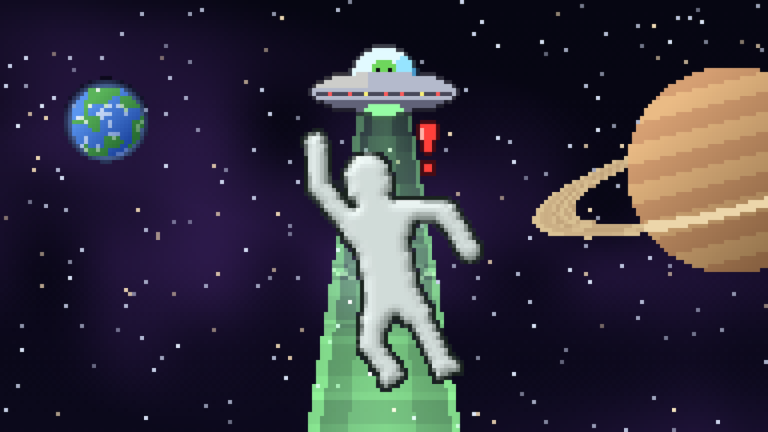 Figure: the SPACE map. Source: the game's official Roblox page.
The 14 maps recorded by name
| Map | Environment seen | When to try it |
|---|---|---|
| LAB | Indoor test room with teleport pads | First experiments and controlled tests |
| GRINDER | Floor grinders with ramp walls | Testing what breaks a dummy apart |
| POOL | A shallow pool beside a ledge | Drowning or floating tests |
| LAVA PIT | A long pit of lava | Fast, obvious results |
| CRUSHER | A press above a bare floor | Testing weight and timing |
| ACID PIT | A pit of green acid | Same idea as lava, different colour and pace |
| SPIKE ROOM | A room with a spike strip on the ceiling | Throwing a dummy upward |
| LASER GRID | Red laser lines across an open room | Watching what cuts and what does not |
| SNOW FIELD | Snowy outdoor slope with a building | Wide shots of a scene rather than a trap |
| DESERT | Sand ground under an open sky | Environment powers, like a wall of water |
| SPACE | Star field with a UFO, Earth and Saturn | Screenshots worth keeping |
| UNDERWATER | Blue water with a visible surface line | Testing things underwater |
| ROOFTOP | City skyline at night with a rooftop edge | Falling tests |
| CASTLE | Stone hall with pillars and banners | A closed room to fill with characters |
What each thumbnail actually shows is in the table.
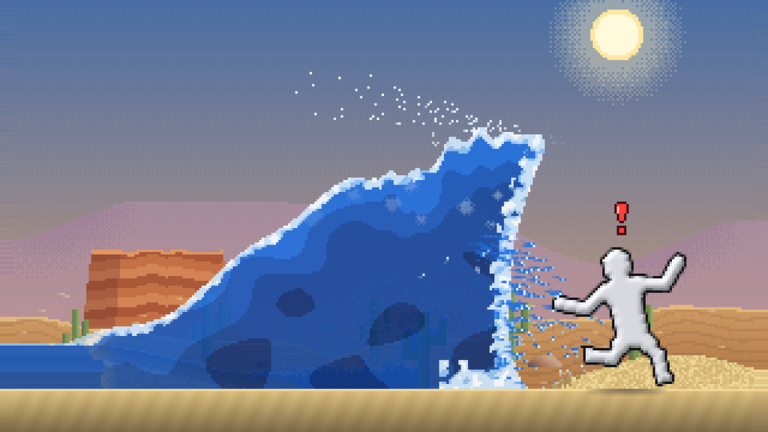 Figure: DESERT with an element power running on it. Source: the game's official Roblox page.
What the name suggests is not: SPACE shows planets, but nothing recorded proves low gravity, so gravity is not claimed anywhere on this page.
Figure: DESERT with an element power running on it. Source: the game's official Roblox page.
What the name suggests is not: SPACE shows planets, but nothing recorded proves low gravity, so gravity is not claimed anywhere on this page.
Three maps are visible but not named yet
Three more thumbnails sit at the bottom of the grid, and their labels were never readable on screen. They are counted in the 17 but not invented for this table. When a recording shows those labels, this page grows by three rows and nothing else changes.
What switching maps does in a shared room
Rooms hold up to 6 players, and that number says nothing about whether a map change is shared, voted on, or applied per player. Nothing recorded answers it. If other players are in the room with you, treat the map change as untested rather than assume everyone moves with you.